Tracking airplanes from your desk sounds like something you would need expensive aviation equipment for. But a growing community of makers has been building flight radar displays using off-the-shelf ESP32 microcontrollers and touchscreens, turning a complex hobby into a weekend project anyone can tackle.
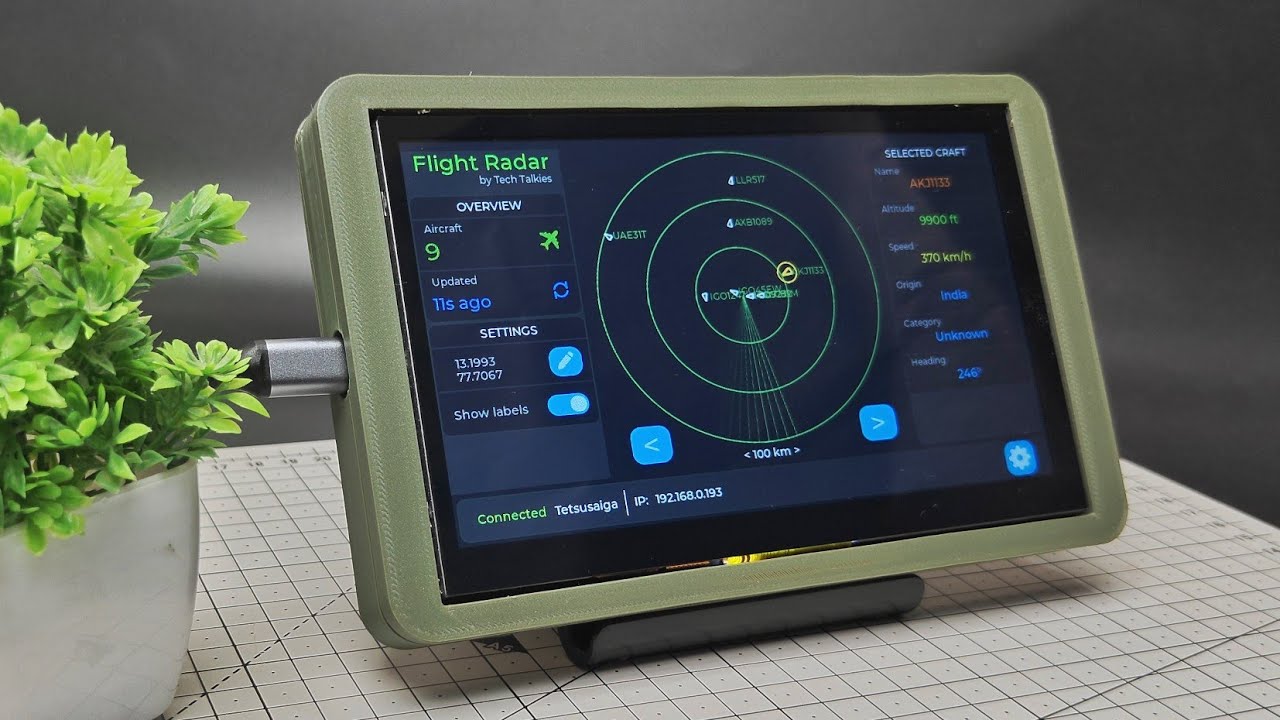
The latest version of this DIY flight radar takes things further with a 7-inch capacitive touchscreen powered by an ESP32 S3 chip, a sleek 3D printed case, and a user interface that rivals commercial aviation displays.
What You Need to Know
- A maker upgraded their ESP32 flight radar to a 7-inch Elecrow Crow Panel touch display with an ESP32 S3 chip, adding a capacitive touchscreen and richer UI features
- The device connects to WiFi, pulls live flight data from the OpenSky Network API, and displays aircraft positions on a radar screen with interactive controls
- Firmware can be flashed directly via the Tik Tokies flasher page, and configuration is done through a built-in web interface, making it accessible even if you cannot compile code yourself
The Hardware Behind the Build
The centerpiece of this upgrade is the Elecrow Crow Panel 7in advanced display, a 7-inch capacitive touchscreen that integrates an ESP32 S3 microcontroller directly into the display assembly. The ESP32 S3 provides enough processing power to handle the touch interface, WiFi connectivity, and radar rendering simultaneously.
The maker designed and 3D printed a custom case that keeps the whole package slim and portable. The result is a self-contained flight tracking station that looks like something you would buy off a shelf but costs a fraction of the price.
Designing the User Interface
The UI was built using Square Line Studio, a drag and drop editor for embedded graphics, and exported directly into an ESP-IDF (Espressif IoT Development Framework) project. This workflow lets designers prototype the interface visually rather than writing raw display code.
The radar screen shows a live map with aircraft positions plotted in real time. A left side panel displays the number of flights currently being tracked and how long ago the data was last refreshed from the OpenSky Network API. Users can edit the radar center coordinates by tapping an edit button and entering their latitude and longitude directly on the touchscreen.
Flight labels can be toggled on and off for a cleaner view. The left and right arrow buttons let users cycle through individual flights to see detailed information on the right side panel, including aircraft identification, altitude, speed, and heading.
A status bar at the bottom of the screen shows WiFi connection status, the network name, and the device IP address, so you always know whether the radar has connectivity.
Getting Started: Flashing and Configuring the Firmware
The firmware is a work in progress and will be open sourced once the maker considers it complete. But you can still get the firmware right now by visiting the Tik Tokies flasher page and flashing it directly onto the Elecrow Crow Panel display. No need to set up a full ESP-IDF development environment.
Once the firmware is on the device, configuration happens in two steps.
First, WiFi setup. When the display boots without any saved WiFi credentials, it scans for available networks and shows them on the left side of the screen. You tap your network, enter the password on the right side panel, and click connect. The display remembers the network for future boots.
Second, API key setup. The radar needs data from the OpenSky Network, a crowd-sourced platform that aggregates aircraft transponder data. You sign up for a free account on the OpenSky Network website, create an API key, and download the credential file. Then, from any device on the same local network, you open the IP address shown on the display's status bar in a browser, upload the credential file, and the radar comes to life.
Custom PCB Manufacturing
For anyone looking to take a project like this further, the build was sponsored by Aivon, a one-stop PCB manufacturing and assembly service. You can upload Gerber files directly to their platform, select board specifications like thickness, layers, and quantity, get an instant quote, and order fully assembled boards without juggling multiple vendors. The service supports everything from quick prototypes to full production runs.
Why This Matters for Makers
This project shows how accessible hardware tracking systems have become. A few years ago, building a live flight radar required dedicated SDR (software defined radio) hardware, antenna setups, and significant coding work. Today, a single ESP32 S3 module with an integrated touchscreen can pull data from cloud APIs and render a polished radar interface out of the box.
The combination of Square Line Studio for UI design, ESP-IDF for firmware, and cloud APIs for data means makers can focus on the product experience rather than fighting with low level drivers. And with services like Aivon handling PCB fabrication, taking a prototype to a finished product is easier than ever.
Bottom Line
A live flight radar with a 7-inch touchscreen, WiFi connectivity, and real-time aircraft tracking is now a realistic weekend project for anyone comfortable flashing firmware onto an ESP32. The hardware is affordable, the software workflow is mature, and the result is a genuinely useful desktop display that brings live air traffic to your home.